Author: Rob Davenport

  • Types of IT Consulting Services: A Practical Guide for Northern Organizations

    Types of IT Consulting Services: A Practical Guide for Northern Organizations

    IT consulting covers several different jobs. One consultant may help leadership decide what to do next; another may build a system or keep existing tools running. Knowing the difference helps you ask for the right work and avoid buying a solution before the problem is clear.

    For organizations working across Northern communities, the choice also has to fit the operating reality: staff may work from multiple locations, travel can take time, and the person responsible for a system may be far from the people using it. Start with the decision or problem your team needs help with.

    What are the main types of IT consulting?

    IT strategy consulting: decide what matters and what comes first

    An IT strategy consultant looks across your goals, current systems, risks, budget and capacity. The useful output is a practical set of priorities: what to keep, what to change, what can wait, and who will own each decision. A roadmap should explain the order of work and the reason for it, not just list new products.

    Choose strategy help when leadership is facing several technology decisions at once, spending is reactive, or vendors are proposing different answers to the same problem. Rovidx’s technology management service combines planning and roadmaps with vendor coordination and leadership through implementation.

    Fractional technology leadership: give the plan an owner

    A fractional IT manager or technology leader takes ongoing responsibility for the technology picture without a full-time senior hire. They help leadership make decisions, coordinate providers, maintain priorities, and follow projects through. Strategy may be one part of this work, but the relationship continues after the roadmap is written.

    This fits an organization whose staff and vendors each handle a piece of IT, but no one is accountable for the whole. Rovidx offers fractional and interim technology management for that situation.

    Cybersecurity consulting: understand and reduce specific risks

    Cybersecurity work can mean a baseline review, a focused assessment, security planning or a separately scoped technical test. Ask what will be examined, what evidence will be used, and what the deliverable will tell you to do next. A baseline review does not replace a penetration test or guarantee compliance.

    Choose this help when you need a clearer view of access, devices, backups and other security basics before committing to fixes. Rovidx’s Northern Cybersecurity Baseline Assessment produces findings and a prioritized action plan; implementation is a separate decision.

    Systems integration: connect tools and remove duplicate work

    Integration consultants help information move between the systems you already use. The work may connect forms, customer records, reporting or approval steps. A good project begins with the real workflow, identifies which system holds the reliable record, and defines what happens when a connection fails.

    Choose integration when staff repeatedly copy information between tools or important work depends on manual handoffs. Rovidx’s digital systems consulting covers connected workflows and practical automation.

    Software development: build something the existing tools cannot do

    Software developers design and build websites, applications, internal tools and other digital products. Development is the right choice when a defined need cannot be met well by configuring or connecting existing systems. The work should include decisions about maintenance, access and who will operate the result.

    Choose a build when you can describe the users, the task they must complete and how you will know the software works. Rovidx’s custom software development and digital projects pages show the types of implementation it takes on.

    Ongoing IT operations: keep everyday systems usable

    Operations work covers recurring tasks such as account changes, device and software lifecycles, renewals, documentation and coordination of support. Some organizations need a managed service provider with a help desk and defined response coverage. Others have providers in place and need someone to oversee them and plan ahead.

    Choose this help when routine ownership is unclear or support is always reactive. Confirm the hours, response expectations and responsibilities before you engage anyone. Rovidx provides technology oversight and vendor coordination; its fractional management service does not promise a 24/7 help desk.

    Which kind of help does your organization need?

    • Too many competing technology priorities? Start with IT strategy consulting and a roadmap.
    • A plan exists but no one can lead it? Look for fractional or interim technology leadership.
    • Unsure where security gaps are? Start with a scoped cybersecurity assessment.
    • Staff copy the same information between tools? Explore systems integration.
    • A specific user task cannot be handled by existing tools? Scope a software project.
    • Accounts, devices and providers need regular attention? Define ongoing operations and support responsibilities.

    These types can overlap. An assessment may reveal a need for a roadmap; a roadmap may identify an integration project. You do not need to commission every kind of work at once. Ask a prospective consultant to name the first decision they will help you make, the deliverable you will receive, and who will own the next step.

    What should Northern organizations ask before hiring?

    • What problem will you investigate first, and what information do you need from our team?
    • Will you advise on vendors independently, coordinate them, or provide the product yourself?
    • Who is responsible for implementation after the recommendation?
    • How will the approach work across our locations and available connectivity?
    • What is included in ongoing support, and what requires a separate scope?

    A clear answer makes it easier to compare proposals and keep ownership inside your organization. For an example of connected digital operations, see Rovidx’s Arctic Marine Training case study. You can also explore all Rovidx services before deciding which conversation to start.

    Talk through the decision

    If you are unsure whether you need a plan, an ongoing technology lead or a defined project, tell Rovidx what is happening. We can help identify a practical first step and the right scope for the work.

  • AI Won’t Kill the Software Business. It Will Change What We Build.

    AI Won’t Kill the Software Business. It Will Change What We Build.

    For years, custom software development followed a fairly simple rule: the problem had to be expensive enough to justify the solution.

    Even a relatively small application could take weeks or months to design, build and test. That meant custom software was usually reserved for large projects, established products or business problems with a clear financial return.

    Smaller operational problems were often left unsolved.

    A company might have employees copying information between systems, renaming hundreds of files or updating records one at a time. Everyone knew the process was inefficient, but building custom software to fix it would cost more than the time it saved.

    Agentic AI is beginning to change that calculation.

    Developers can now move from an idea to a working application much faster. This makes it practical to build focused tools for problems that would never have justified traditional development costs.

    We recently experienced this firsthand at Rovidx.

    The problem: moving a large video library

    We have a library of more than 800 videos stored on Vimeo for one of our streaming projects.

    Vimeo has worked well for us, but it was no longer the best fit for how we wanted to manage and deliver this particular library. We decided to move the videos to Bunny, keep a local archive of the original files and update the video links inside our WordPress content management system.

    The migration presented a few challenges.

    Many of the videos were private and required authenticated access. Our WordPress database contained Vimeo HLS URLs rather than simple public video links. Each video needed to be downloaded, saved locally, uploaded to Bunny and matched with the correct WordPress content.

    The old URL then needed to be replaced without disturbing the rest of the content.

    Doing this manually would have meant:

    • Finding each video in Vimeo
    • Downloading the original file
    • Saving it into an organized local archive
    • Uploading it to the correct Bunny library
    • Finding the matching post in WordPress
    • Replacing the old Vimeo stream URL
    • Confirming the new video worked
    • Tracking which videos had been completed

    Repeating that process hundreds of times would have consumed days of attention. It would also have created plenty of opportunities for mismatched videos, duplicate uploads and incorrect links.

    It was exactly the kind of repetitive problem that should be automated.

    Building a purpose-built migration tool

    Instead of moving the library manually, I scoped out a small Electron application to manage the process.

    The application needed to connect securely to Vimeo using OAuth, access the private video library and download the source files. It also needed to connect to Bunny, upload each video and monitor its processing status.

    On the WordPress side, it needed to identify posts containing old Vimeo HLS URLs and replace them with the correct Bunny URLs.

    The application also needed practical safeguards:

    • A local archive of every downloaded video
    • Migration progress and status information
    • A clear record of successful and failed transfers
    • Retry support when a download or upload failed
    • Protection against uploading the same video twice
    • The ability to resume an interrupted migration
    • No automatic deletion of the original Vimeo files

    I worked through the requirements and gave the plan to Codex to build and test.

    About an hour later, I had a working application with an interface for connecting the services, reviewing the library and managing the migration.

    The app turned a long series of manual tasks into a process that could run automatically and be monitored from one place.

    There was still human work involved. The requirements had to be defined. Authentication, matching logic and failure handling needed to be considered. The results also had to be tested before the software could be trusted with the full library.

    AI made the implementation dramatically faster. It did not remove the need to understand the problem.

    The real change is which problems become worth solving

    The interesting part of this project isn’t the video migration itself.

    A video migration tool has a narrow purpose. We may use it for this project, complete the migration and never need it again.

    In the past, that limited lifespan might have made the software difficult to justify. It would have been easier to assign someone the manual work than spend weeks developing an internal application.

    That calculation changes when a useful tool can be designed and built in hours.

    Businesses deal with small inefficiencies every day:

    • Staff copy information from emails into a CRM
    • Reports are assembled from several spreadsheets
    • Documents are manually renamed and filed
    • Product information is entered into multiple systems
    • Customer records are checked against separate databases
    • Media files are downloaded, converted and uploaded individually
    • Website content is updated one page at a time

    A large software platform may be unnecessary for these problems. In many cases, the business already has the systems it needs. The missing piece is a focused tool that connects those systems or automates one painful part of the workflow.

    AI-assisted development makes more of these tools economically practical.

    Custom software can become smaller and more specific

    Software companies have traditionally tried to build products that serve as many customers as possible. That makes sense when development is expensive. The cost needs to be spread across a large customer base.

    The result is often a platform filled with features that individual customers never use.

    AI makes another model possible.

    Instead of forcing a company to change its processes to fit a general-purpose product, developers can build smaller applications around the company’s existing workflow.

    That could be:

    • A desktop utility that processes files in a specific way
    • An internal dashboard that combines information from several services
    • A tool that moves data between two systems
    • A customer portal built around an existing business process
    • An application that turns a manual approval process into a managed workflow
    • A specialized importer for an unusual data source
    • A reporting tool designed around the metrics a company actually uses

    These applications don’t need to become large SaaS products. They need to solve the problem reliably.

    For a small business, saving an employee five hours every week can be meaningful. Preventing recurring data-entry errors can be even more valuable. Until recently, the cost of developing the solution could easily outweigh those benefits.

    That barrier is getting lower.

    Fast development still requires experience

    It would be easy to look at tools like Codex and conclude that software development has become automatic.

    It hasn’t.

    AI can write code quickly, but speed alone doesn’t produce dependable software. Someone still needs to understand the workflow, identify the risks and decide what the application should do.

    In the video migration project, the difficult questions weren’t about drawing buttons on the screen.

    They were questions like:

    • How do we securely access private videos?
    • How do we match a Vimeo video to the correct WordPress post?
    • What happens if an upload succeeds but the CMS update fails?
    • How do we prevent duplicate work?
    • Can the migration safely resume after an interruption?
    • How do we confirm that the new video is ready before replacing the old URL?
    • What information should be logged for troubleshooting?
    • Which actions should never be automated?

    These are software design and business-process questions.

    AI helps an experienced developer explore options, produce code and test an implementation much faster. The developer still provides the context, judgment and accountability.

    That distinction matters when software is touching customer records, financial information, private media or essential business systems.

    What this means for Rovidx

    For Rovidx, this expands the range of problems we can reasonably help clients solve.

    A client may not need a six-month software project. They may have one recurring task that wastes time every week. They may use several platforms that don’t communicate properly. They may have an internal process held together by spreadsheets, emails and manual updates.

    Previously, building a custom solution for that kind of problem could have been too expensive.

    Now we can examine the workflow, identify the bottleneck and determine whether a focused application or automation can remove it.

    Some solutions may become full software products. Others may be small internal tools designed for one company and one specific job. Both can create real value.

    This also changes how we think about software planning.

    Instead of spending months trying to define every possible feature before development begins, we can build a smaller working version, test it against the real process and improve it based on what we learn.

    That reduces the risk of building the wrong thing. It also helps clients see results sooner.

    A different kind of software business

    AI is going to put pressure on parts of the traditional software industry. Development timelines will shrink. Clients will expect faster results. Some types of routine coding will become less valuable on their own.

    At the same time, more businesses will be able to consider custom software for the first time.

    The opportunity is no longer limited to building large platforms.

    There is a growing need for people who can understand how a business operates, find the expensive or frustrating parts of the workflow and turn those problems into reliable software.

    That combination of business understanding and technical judgment will matter more as writing the initial code becomes faster.

    The video migration application started as a way to avoid hours of repetitive work. It ended up demonstrating something much larger.

    When software becomes faster to create, we don’t simply build the same products more quickly. We can start solving an entirely different class of problems.

    And for many businesses, those smaller problems may be the ones most worth solving.

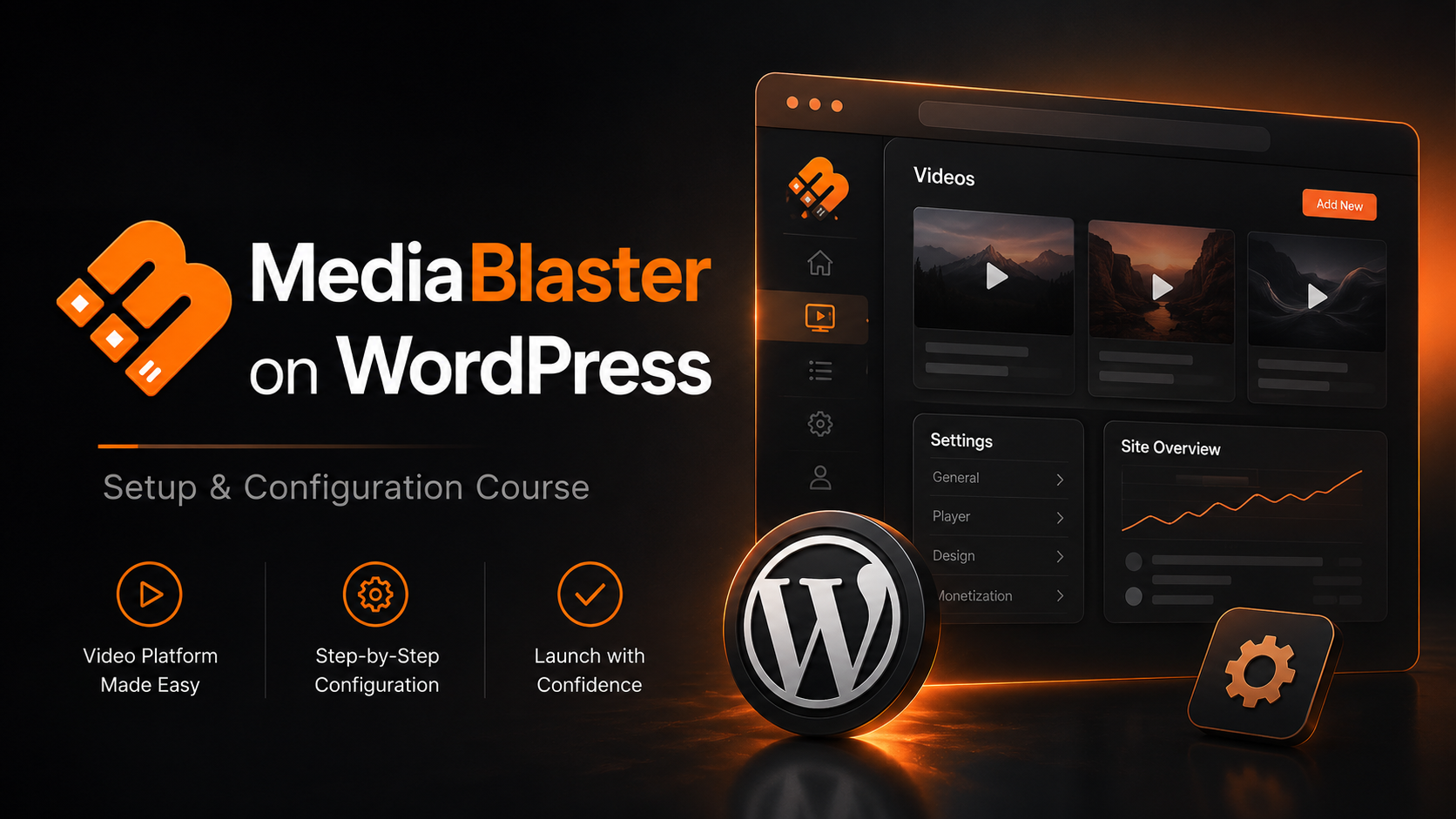
  • How to Build Your Own Netflix-Style Streaming Site (100% Free Training Course!)

    How to Build Your Own Netflix-Style Streaming Site (100% Free Training Course!)

    Have you ever wanted to launch your own video-on-demand (VOD) streaming platform, but backed away after seeing the massive price tags and technical headaches?

    We get it. Building a premium video site usually requires an army of expensive developers or restrictive, over-priced third-party SaaS platforms.

    But what if you could turn a standard WordPress website into a powerhouse streaming hub—complete with standalone movies, organized TV seasons, and vertical short-form video clips? And what if you could learn exactly how to do it in under an hour, completely for free?

    We just launched our official MediaBlaster Training Course, and it is open for registration right now. No catches, no hidden fees, and absolutely no purchase necessary.

    What is MediaBlaster?

    MediaBlaster is a native WordPress plugin designed to do one thing beautifully: transform your website into a sleek, customized media-streaming engine. It handles everything from backend video metadata management to seamless integration with premium video hosts like Vimeo, AWS, and BunnyCDN.

    Whether you are looking to build a private niche streaming network, an educational portal, or a public content platform, MediaBlaster gives you the structural framework of a major streaming app right inside the WordPress dashboard you already know and love.

    What You Will Learn in the Course

    We know your time is valuable. That’s why we skipped the fluff and broke this training down into short, bite-sized, step-by-step video modules.

    Here is a quick look at the roadmap:

    🛠️ Part 1: Installation & Core Configuration

    We kick things off with a quick walkthrough on how to log in and activate the MediaBlaster toolkit. From there, we give you a tour of the General Settings panel, showing you how to customize your media types and disable old legacy controls to keep your backend workspace perfectly clean.

    🎬 Part 2: Mastering Content Types

    Not all video content is built the same. We show you how to handle three distinct formats:

    • Standalone Movies: How to add individual, standalone feature pieces and attach quality metrics (SD, HD, 4K), genres, and parental ratings.
    • Episodic Series: How to bundle separate video assets into structured Seasons and Episodes, then link them into a main show container.
    • Short-Form Videos: How to unlock a vertical, mobile-first 9:16 aspect ratio feed (just like TikTok or Instagram Reels) for quick clips and teasers.

    ☁️ Part 3: Deep Vimeo Integration

    This is where the magic happens. We walk you through setting up a private Vimeo API application to securely connect your website to your hosting account. Once connected, you will learn how to:

    1. Directly Upload: Push local video files from WordPress straight to Vimeo.
    2. Mass Import: Populate your entire site library by pulling down dozens of Vimeo videos at scale in a single click—complete with automatically synced titles, run times, and cover art.

    📺 Part 4: Designing the Front-End (Gutenberg & Elementor)

    A great backend means nothing without a beautiful user interface. We wrap up by showing you how to use our free front-end tools. You’ll see how to drop dynamic Gutenberg Blocks onto a page, extract Dynamic Shortcodes, and build fully custom landing page templates using Elementor Pro’s Theme Builder.

    🚀 Ready to Take It a Step Further? For creators looking to move past the web and onto actual televisions, we also introduce our native Roku Launch Kit. It works hand-in-hand with MediaBlaster to push your WordPress video data directly onto smart TVs worldwide.

    How to Enroll (Seriously, It’s $0)

    This training is our gift to the creator community. There are no paywalls, no credit cards required, and you don’t need to buy a single thing to build exactly what we show you in the videos. All you need to get started is an active WordPress website and administrator access.

    The entire course is waiting for you right now in our community classroom.

    👉 [Click Here to Access the MediaBlaster Course and Start Building Today!]

    Would you like me to add a specific section to this blog post detailing how MediaBlaster handles alternative video hosts like AWS or BunnyCDN, or does this cover everything you want for the launch announcement?

  • Introducing Media Blaster: Turn Your WordPress Blog Into a Fully Produced Podcast — Automatically

    Introducing Media Blaster: Turn Your WordPress Blog Into a Fully Produced Podcast — Automatically

    There’s a moment in every creator’s journey where you feel the gap — the distance between the content you want to publish and the time you actually have.

    You write blog posts. You run a site. You have ideas. You have a voice.

    But somewhere between writing, editing, managing plugins, SEO, posting to social, and everything else that eats your day, one dream keeps slipping out of reach:

    “I should really turn this blog into a podcast.”

    Media Blaster exists to make that dream effortless.

    Not someday.

    Not “when you have more time.”

    Right now.

    What Media Blaster Really Does

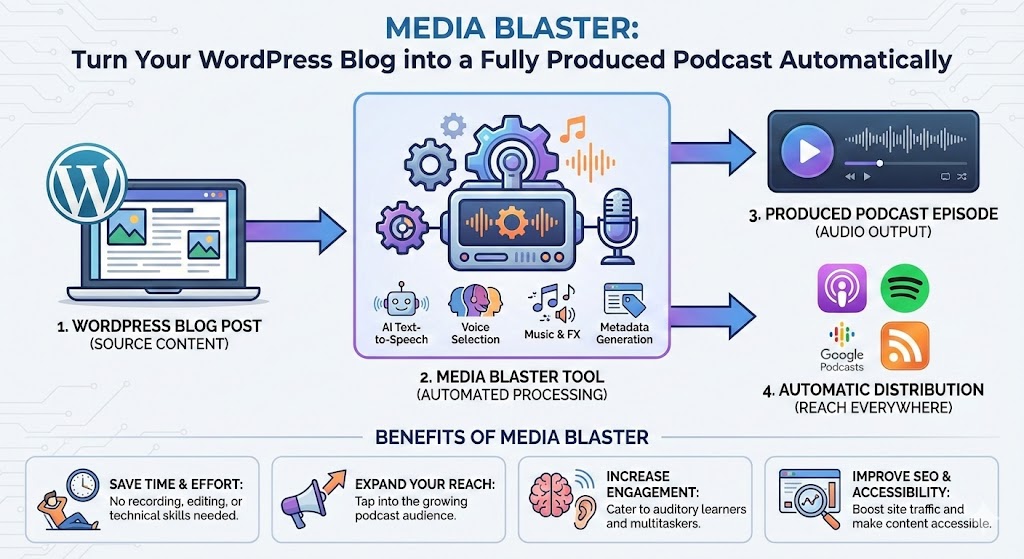
    At its core, Media Blaster takes your WordPress content — a single post or a whole collection — and transforms it into a complete, publish-ready podcast episode.

    Automatically.

    No microphone.

    No audio timeline.

    No learning curve.

    No “I’ll do it later.”

    You choose your posts, pick your host voice, click a button, and Media Blaster handles everything that usually eats hours of a creator’s life.

    The Experience We Designed for You

    Forget features for a second — let’s talk about what it feels like to use Media Blaster.

    You press “Generate Episode.”

    You get a clean, professional podcast episode narrated by a consistent AI host trained to match your tone.

    It sounds like something you’d expect from a well-funded studio — only you didn’t open a DAW, record anything, or fight with FFmpeg at 2 a.m.

    Media Blaster handles:

    • Script composition
    • Voiceover generation
    • Editing and mixing
    • Mastering
    • Metadata
    • And yes — direct publishing to Spreaker (or downloading to upload anywhere else)

    In other words:

    You write, Media Blaster broadcasts.

    Check out this fully produced podcast based of this blog post. Created by Media Blaster!

    The Dream We’re Actually Selling

    Creators don’t want more tools.

    They want more reach.

    Podcasts are one of the most powerful discovery channels on the internet… but historically, they’ve required time, gear, experience, or budget.

    That’s the bottleneck we wanted to destroy.

    1. Your blog becomes a multi-channel content engine.

    Every WordPress post becomes a podcast episode — not in theory, but in practice.

    Write once → publish as text and audio everywhere.

    Suddenly your site speaks. Literally.

    2. Your voice is always “on,” even when you’re not.

    Media Blaster doesn’t get tired.
    It doesn’t lose its tone.
    It doesn’t miss a publishing window.

    It gives your content a narrator that speaks your message with clarity and reliability.

    3. You stop choosing between quality and consistency.

    You can publish weekly, daily, or whenever inspiration hits — without sacrificing polish.

    Consistency is the thing most creators struggle with.
    Media Blaster makes it the thing you never have to worry about again.

    4. You unlock a new audience without lifting a finger.

    Some people read.

    Some people listen.

    Some people only consume content while driving, cooking, or commuting.

    Right now, your blog only reaches one of those groups.

    A podcast version means your ideas travel into moments where text can’t go.

    5. You get to think bigger again.

    When the production burden disappears, you start imagining:

    • A weekly commentary show
    • A narrated version of your entire blog archive
    • A branded podcast for your business
    • A daily voice digest for your community
    • Bonus audio content for subscribers
    • A niche show covering your industry or hobby

    All achievable without adding staff, learning audio engineering, or sacrificing your time.

    That’s the dream we wanted to unlock.

    You give Media Blaster one or more blog posts.
    The system:

    1. Reads and analyzes your content
    2. Builds a coherent, natural script based on your writing
    3. Generates consistent voice narration using a host persona you control
    4. Assembles and masters the audio automatically
    5. Publishes directly to Spreaker — or exports for any platform

    Everything happens inside a clean workflow powered by modern web technology.

    You don’t have to understand a single line of it.

    You just hit publish.

    Who Media Blaster Is For

    This early edition is built for creators who want their written content to go further, including:

    • Bloggers who want audio versions of their posts
    • WordPress publishers with large archives
    • Businesses wanting a branded podcast
    • Newsletters and niche blogs expanding into audio
    • Agencies producing podcasts for clients
    • SEO-focused creators who want multi-format distribution
    • Anyone who thinks, “I could have a podcast… if I had more time”

    If your blog has a voice, Media Blaster gives it a microphone.

    The Bigger Vision

    This is only the beginning.

    Today, Media Blaster turns written content into studio-quality podcasts.

    But the roadmap leads to:

    • Automated video versions
    • Dynamic visual clips for social
    • Multi-voice productions
    • Multi-language translations
    • Story-to-podcast pipelines
    • True multi-brand media automation
    • And fully autonomous content networks

    This is just the foundation — the first layer of something much bigger.

    Early adopters won’t just use the platform.

    They’ll shape it.

    If You’ve Ever Wanted a Podcast but Never Had the Time… Now You Do

    You already have the content.

    You already have the audience.

    You already have the voice — even if you’ve never recorded a word.

    Media Blaster handles the hard part so you can focus on your ideas, your writing, and your business.

    This is the beginning of a new kind of content workflow — one where your blog doesn’t just sit on the page.

    It speaks.
    It narrates.
    It connects.
    It evolves with you.

    Your WordPress blog deserves to be a podcast. Now it finally can be — automatically.

    Welcome to Media Blaster. Let’s amplify your voice.

    Want to be one of the first users and get some really cool bonuses? Click here to get on our “Early Access” list.

  • Strategic AI Tools for Talent Acquisition Efficiency

    Strategic AI Tools for Talent Acquisition Efficiency

    Navigating AI Trends and Tools: How Emerging Technologies Are Reshaping Business Efficiency

    Key Takeaways

    • AI accessibility is expanding: User-friendly platforms and tools like Microsoft Copilot, n8n, and GitHub Copilot let non-technical teams deploy sophisticated solutions.
    • Integration yields the biggest gains: Combining generative AI, edge computing, IoT, and workflow automation can reduce manual labor by up to 70% and accelerate time-to-market by 30%.
    • Measure and govern AI outputs: Features like performance tracking and transparent auditing mitigate bias, improve engagement, and ensure regulatory alignment.
    • Start small, scale smart: Automate repetitive tasks first (e.g., content automation, predictive maintenance), then expand into hybrid AI–human workflows for greater impact.

    Introduction

    In the fast-paced world of digital transformation, staying ahead means mastering the latest AI trends and tools that drive innovation and operational excellence. As businesses face rising demands for efficiency and scalability, AI offers unprecedented opportunities to automate workflows, enhance decision-making, and unlock new revenue streams.

    At AI TechScope, we’ve seen how integrating cutting-edge AI can transform everyday operations into streamlined powerhouses. This article explores that evolving landscape and provides a strategic path forward for organizations ready to embrace change.

    The Evolving Landscape of AI Trends and Tools

    To understand where AI is headed, it helps to recognize the foundational shifts propelling these technologies. AI now blends machine learning algorithms, natural language processing, and computer vision to mimic and augment human capabilities.

    In a competitive market, efficiency is currency.

    Generative AI Momentum

    Generative AI — driven by models like GPT-4 — has exploded, creating text, images, and code that accelerate content creation and prototyping. Microsoft’s recent Copilot enhancements add features such as image animation and performance tracking, allowing users to bring static visuals to life and monitor AI efficacy in real time.

    These capabilities are game-changers for marketing teams producing engaging campaigns or educators building interactive learning materials. When combined with performance metrics, businesses gain actionable insights to refine outputs iteratively.

    Accessibility and Tools

    What makes today’s AI trends and tools compelling is accessibility. Gone are the days where only data scientists could leverage AI. Platforms like n8n, Zapier, and GitHub Copilot enable non-technical teams to deploy sophisticated solutions across operations.

    Developers still rely on frameworks like TensorFlow and PyTorch to build models, but the business value lies in integration — connecting these models to workflows and applications so teams can act on insights quickly.

    Why AI Trends and Tools Are Critical for Business Strategy

    Turning understanding into strategy requires a clear framework. Executives often face information overload, with trends emerging daily. The central insight: AI is about augmenting human work so people can focus on higher-value tasks.

    Performance Tracking and Iteration

    Performance tracking, as implemented in tools like Copilot, goes beyond logging data. Dashboards reveal inefficiencies — for example, an AI-generated report that underperforms in engagement — and enable iterative improvements, such as adding animated visuals to boost retention.

    In practice, a logistics firm might animate route maps to help drivers visualize optimal paths, which can reduce delivery times by 15%.

    IoT Integration & Predictive Maintenance

    Integration of AI with IoT devices creates smart ecosystems that predict maintenance needs before failures occur. In manufacturing, AI-powered sensors analyze vibration data in real time, flag anomalies, and trigger automated alerts.

    Such predictive maintenance, trained on historical failure data, has the potential to slash downtime costs by millions annually.

    Strategic Prioritization for Entrepreneurs

    Entrepreneurs should prioritize AI tools that align with core operations. AI TechScope’s n8n automation expertise focuses on connecting disparate systems — for instance, linking CRM data to AI analytics for personalized marketing.

    A mid-sized e-commerce client we worked with automated email campaigns using generative AI to craft tailored messages, resulting in a 25% uplift in conversion rates. The workflow pulled customer data into n8n, generated content via APIs, and tracked performance metrics seamlessly.

    Ethics and Governance

    As AI tools proliferate, ethical considerations—like bias in algorithms—demand attention. Transparent tracking features, such as those added to Copilot, help audit outputs for fairness and traceability.

    Businesses that embed ethics early not only comply with evolving regulations but also build trust with customers, a critical differentiator in consumer-facing industries.

    Practical Applications: Implementing AI Trends and Tools in Your Operations

    Deployment does not require an infrastructure overhaul. The practical approach is to start small and scale smart: identify repetitive tasks ripe for automation, then expand to more complex workflows.

    Content Automation & Social Media

    For content teams, Copilot’s image animation can automate social media posts: input a product photo, animate it into a short video, and schedule distribution while tracking virality. These workflows typically use API calls to AI services and generative adversarial networks (GANs) to create fluid animations.

    The business impact includes faster content cycles, reduced creative costs, and data-driven refinements.

    Operations Optimization & Supply Chain

    In supply chain management, AI analyzes news feeds and weather data to forecast disruptions and reroute shipments proactively. Clients integrate predictive models with ERP systems via n8n so managers receive alerts about potential delays and can adjust plans, saving on expedited shipping fees.

    Hybrid AI–Human Workflows

    Innovation teams can use hybrid workflows to accelerate product development. Tools like GitHub Copilot suggest code snippets that speed prototyping, and when combined with performance tracking, teams can bring products to market up to 30% quicker.

    AI TechScope’s website development services enhance this by building AI-integrated sites that personalize user experiences using recommendation engines and real-time adjustments.

    Training and the Human Element

    Don’t overlook people. Training programs and AI literacy workshops maximize tool adoption and ROI. AI TechScope offers workshops on n8n and AI strategy to ensure smooth transitions.

    A fintech startup we advised automated compliance checks through AI document analysis, cutting review times from days to hours while maintaining accuracy with tracked performance metrics.

    Future Outlook: Where AI Trends and Tools Are Heading

    The trajectory of AI points to deeper integration and greater intelligence. Quantum computing may one day supercharge models to solve problems now taking days in seconds. Multimodal AI—combining text, image, and voice—will make successors to tools like Copilot more versatile.

    Quantum, Multimodal AI, and Edge Trends

    Advances in multimodal AI could enable the animation of entire virtual environments for training. Meanwhile, edge AI will push processing closer to data sources, enabling real-time decisions in remote operations.

    Business Implications of Emerging AI

    Companies investing in scalable AI infrastructures now will gain competitive advantage through hyper-personalization and predictive insights. At the same time, data privacy and AI governance will become more pressing, requiring robust strategies.

    AI TechScope helps businesses navigate this horizon with AI-powered automation, n8n workflow development, and advisory services to implement edge AI and other trends efficiently.

    Conclusion & Call to Action

    Embracing AI trends and tools is imperative for sustainable growth. From Microsoft’s Copilot enhancements to broader automation waves, opportunities for efficiency and innovation are boundless.

    If you’re ready to transform operations, AI TechScope is here to guide you. As a provider of virtual assistant services specializing in AI-powered automation, n8n workflow development, and business process optimization, we help businesses scale operations, reduce costs, and improve efficiency through intelligent delegation and automation solutions.

    Contact us today for a consultation and let’s build your AI future together. (Word count: 1,678)

    FAQ

    How should companies approach AI adoption?

    Start small and prioritize automating repetitive, high-volume tasks. Use no-code or low-code tools like n8n and Zapier to prototype workflows before scaling. Align pilots with measurable KPIs so you can prove impact and iterate.

    What about data privacy and governance?

    Embed governance early: track model outputs, log data usage, and audit for bias. Leverage platforms with performance tracking and transparency features to ensure compliance and maintain trust with customers.

    How can n8n help integrate AI into existing workflows?

    n8n acts as the glue between systems, connecting CRMs, ERPs, and AI APIs to automate end-to-end processes. Common use cases include personalized marketing, predictive alerts in operations, and automated content pipelines.

    How do I measure AI performance effectively?

    Use a combination of engagement metrics, error rates, and business KPIs tied to the AI use case. Performance tracking tools in platforms like Copilot provide dashboards to monitor outputs, enabling iterative refinement.

  • Welcome to Rovidx Media & Consulting, Inc.

    Welcome to Rovidx Media & Consulting, Inc.

    We’re glad you found us. This is the start of something new, and we’re excited to bring you along. Beginning September 1st, we’ll be rolling out fresh content right here—insights, updates, and resources designed to help you get the most from what Rovidx has to offer.

    Who We Are

    Rovidx Media & Consulting, Inc. is a Canadian company that operates and invests in SaaS products while also offering consulting in the areas of technology, media, and business strategy. Our focus is practical: building tools that solve real problems and helping businesses use technology more effectively.

    We’ve grown from a small, internet-focused business into a multi-faceted operation. On one side, we own and manage SaaS products that serve specialized markets. On the other, we work with clients who need sharp, actionable advice on digital infrastructure, automation, and growth strategy.

    At the core, Rovidx exists to make digital work simpler, smarter, and more sustainable.

    What to Expect

    Starting September 1st, this blog will become your go-to spot for:

    • Product updates: What’s new with our SaaS tools and how they can support your business.
    • Behind-the-scenes insights: Lessons learned from building, scaling, and maintaining internet products.
    • Consulting perspectives: Practical advice on systems, automation, and online growth.
    • Company news: Milestones, partnerships, and the occasional peek at what’s next.

    Looking Ahead

    This is just the beginning. Rovidx Media & Consulting, Inc. was built on the idea that technology should serve people—not the other way around. As we grow, we’ll continue to share not just what we’re building, but also how we think about the future of work, media, and digital tools.

    So bookmark this space, subscribe to updates, and check back often. New content is coming September 1st, and we can’t wait to share it with you.